
Guides
Top 5 Topaz Gigapixel Alternatives in 2026
Topaz Gigapixel is powerful but expensive and desktop-only. Here are the top 5 alternatives — including free, web-based options that require no installation.
Topaz Gigapixel AI has built a strong reputation for upscaling quality, but it's subscription-only at $29/month (or $149 billed annually) for the Personal plan, and it's desktop-only — meaning you need to download and install software just to enlarge a single photo. If you want something faster, cheaper, or accessible from a browser, here are the five best Topaz Gigapixel alternatives in 2026.
1. PicUpscaler — Best Overall
PicUpscaler is a web-based AI image upscaler that runs entirely in your browser — no software to install, no learning curve. Upload your image, choose your upscale factor, and get a sharper, higher-resolution result in seconds.
Core features:
- 2x, 4x, and 8x upscaling
- AI background removal
- Works on photos, product images, illustrations, and more
- No account required to start (2x upscaling works for anonymous visitors, subject to a daily usage limit)
Pros:
- No installation — works on any device with a browser
- Free to start; subscription plans unlock higher resolution and more credits
- Consistently sharp results on real-world photos, product shots, and landscapes
- Background remover included — useful for e-commerce workflows
Cons:
- Requires an internet connection (no offline mode)
Best for: Anyone who wants Gigapixel-quality upscaling without the desktop software commitment. Especially useful for e-commerce sellers, designers, and casual users who need great results fast.
Upload Your Image
Drag and drop or click to browse. JPG, PNG, and WebP supported.
We tested it: same image at 2x / 4x / 8x
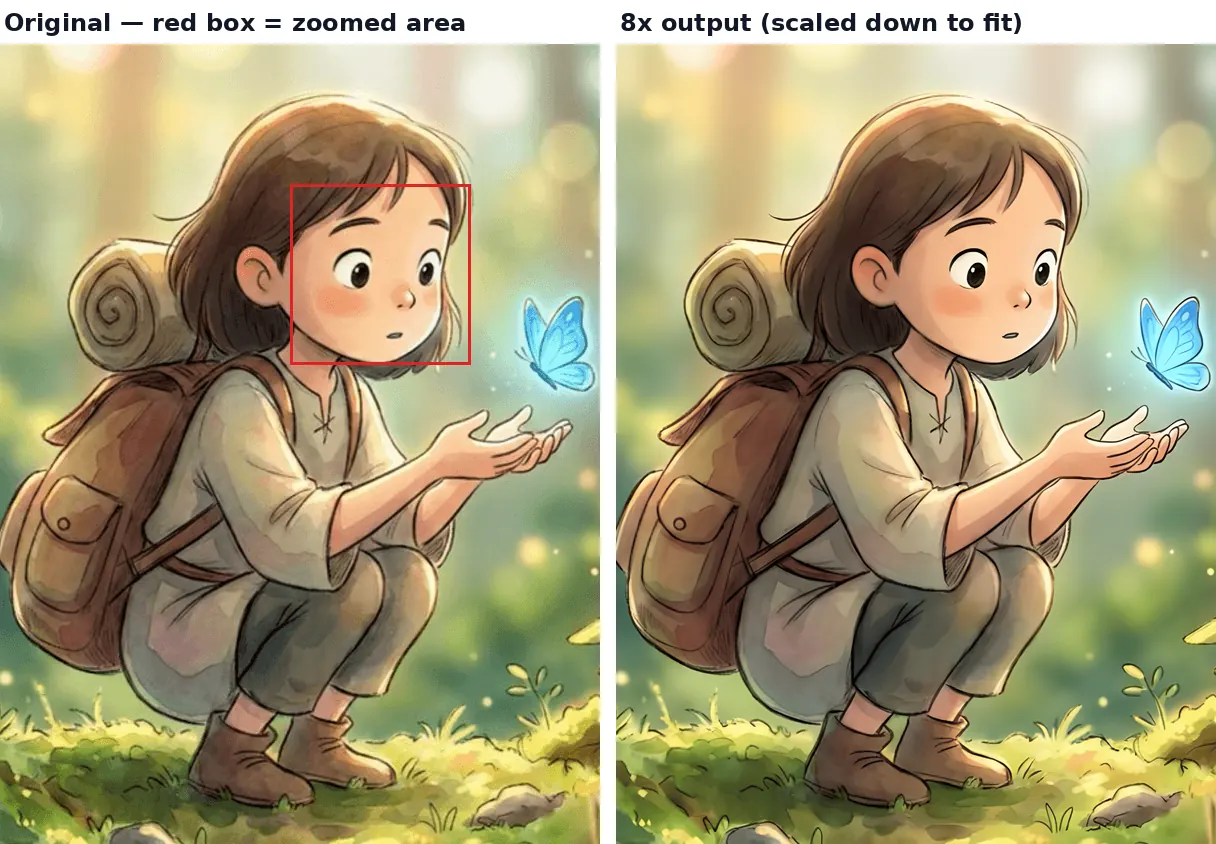
To show what PicUpscaler actually produces rather than just describe it, here's one real photo run through all three upscale tiers.
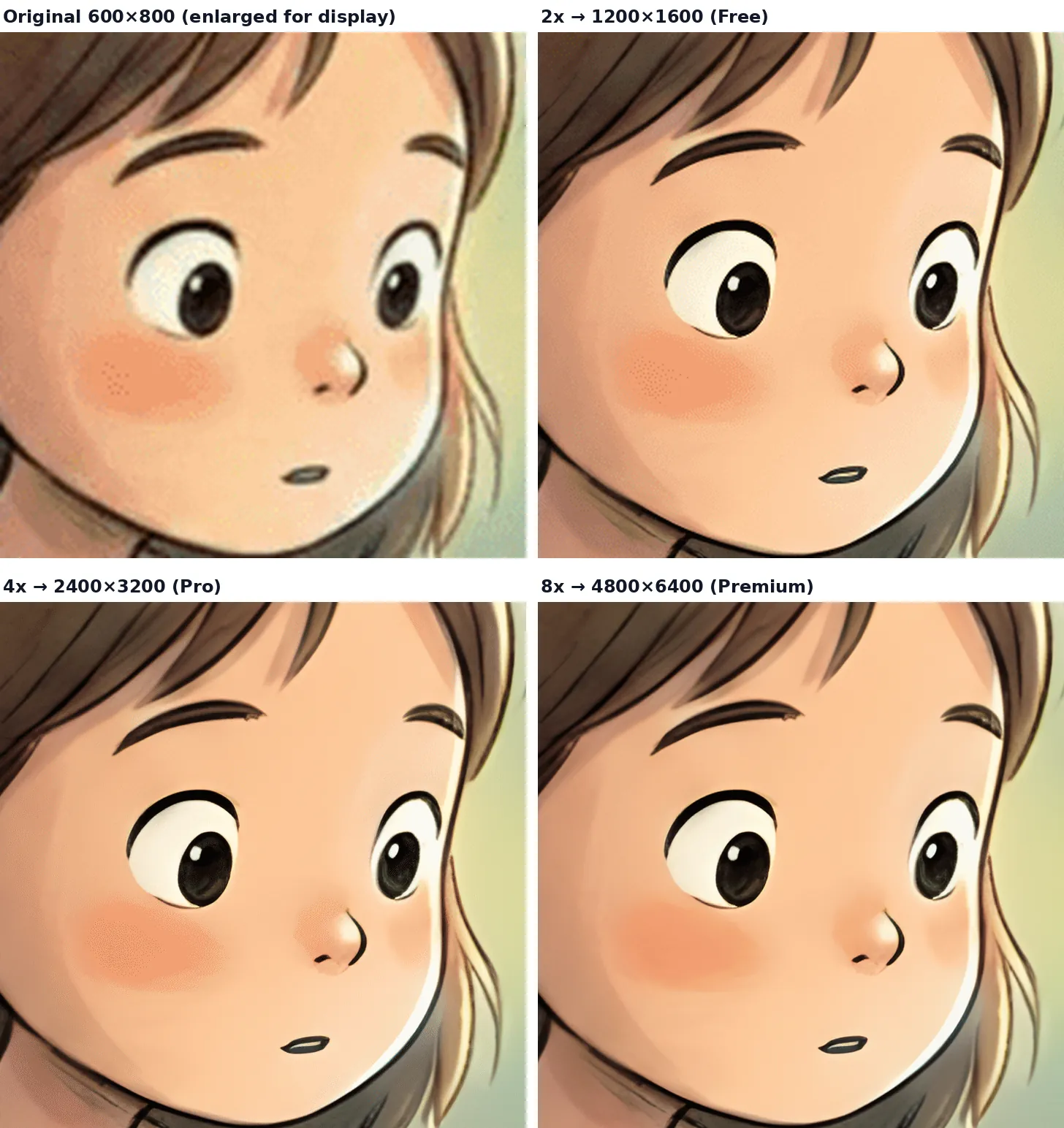
| Version | Output size | Plan required | Max print size at 300 DPI |
|---|---|---|---|
| Original | 600×800 px | — | 2.0in × 2.7in |
| 2x | 1200×1600 px | Free | 4.0in × 5.3in |
| 4x | 2400×3200 px | Pro | 8.0in × 10.7in |
| 8x | 4800×6400 px | Premium | 16.0in × 21.3in |
The four-panel image above shows the same cropped region (a 180×180px area from the original) at each tier, scaled up to the same display size so detail differences are visible side by side. The full output dimensions for each tier are listed in the table above, not the crop's own pixel size.
We don't have a verified Topaz Gigapixel output for this same image to compare against, so this section only documents PicUpscaler's own results — draw your own conclusions on quality by comparing against Topaz's own sample gallery or a free trial run.
2. Let's Enhance
Let's Enhance is a web-based upscaler with a focus on photo quality enhancement alongside resolution increase. It's been around for several years and is a solid option for photographers who want more than just pixel-doubling.
Core features:
- Up to 16x upscaling
- Smart enhancement and noise reduction
- Batch processing on paid plans
- API access available
Pros:
- Good output quality on portrait and landscape photography
- Web-based — no install needed
- Batch processing available
Cons:
- Free tier is very limited (a few credits to test)
- Paid plans start at $9/month (Starter, billed annually; $12/month billed monthly) and can get expensive at scale
- Slower processing times on larger images
Best for: Photographers and small studios who need occasional high-quality upscaling and don't mind paying for a dedicated service.
3. Upscayl
Upscayl is a free, open-source desktop upscaler that runs AI models locally on your machine. It's the closest free equivalent to Topaz Gigapixel in terms of offline capability.
Core features:
- Multiple AI models to choose from (general, anime, photo-realistic)
- Runs fully offline — no uploads to a server
- Available on macOS, Windows, and Linux
- No usage limits
Pros:
- Completely free with no usage caps
- Privacy-friendly — images never leave your computer
- Good quality output, especially with the right model selected
Cons:
- Requires download and installation
- No web version; requires a reasonably powerful GPU for fast results
- Model selection adds a learning curve for non-technical users
Best for: Privacy-conscious users, developers, or anyone processing large batches of images offline who wants a free Gigapixel-style workflow.
4. Adobe Photoshop Super Resolution
If you're already on an Adobe Creative Cloud subscription, Photoshop's built-in Super Resolution feature (via Camera Raw) offers solid upscaling without any additional cost. It's not a standalone tool, but it's hard to beat for integrated workflows.
Core features:
- 2x upscaling via Camera Raw (stackable for 4x)
- Integrates directly with Photoshop editing workflow
- Works on RAW files natively
Pros:
- Already included with Photoshop CC — no extra cost if you subscribe
- Seamlessly fits into existing retouching and editing workflows
- Solid quality on photographic content
Cons:
- The Photoshop single-app plan costs $22.99/month (billed annually) — expensive if upscaling is all you need
- No standalone option; overkill for users who just need simple upscaling
- Limited to 2x per pass (4x requires two passes)
Best for: Existing Adobe CC subscribers who want to upscale inside their current workflow without switching tools.
5. Magnific AI
Magnific AI is a newer, high-end AI upscaler that goes beyond standard upscaling — it can hallucinate and enhance fine detail based on a prompt, producing striking results on creative and artistic imagery.
Core features:
- Up to 16x upscaling with AI enhancement
- Prompt-guided detail generation
- Strong results on portraits, concept art, and stylized imagery
Pros:
- Exceptional detail enhancement, especially on creative content
- Unique "reimagination" capability for artistic use cases
- Web-based
Cons:
- Its Premium plan is listed at MYR 79/month (billed monthly) or MYR 55/month (billed annually) on the official pricing page — roughly $16–17/month, among the pricier options on this list
- Overkill (and potentially unpredictable) for straightforward photo upscaling
- Results vary; detail hallucination can go wrong on technical or document imagery
Best for: Professional photographers, digital artists, and game designers who want the maximum possible quality and are happy to pay a premium for it.
When Topaz is the better choice
Web-based upscalers aren't the right fit for every workflow. Topaz Gigapixel (and Upscayl, its free counterpart) genuinely wins in a few situations:
- Heavy batch processing. If you're upscaling hundreds or thousands of images in one run, a local desktop tool with unlimited local rendering avoids per-image upload time and credit/quota limits that web services impose.
- Fully offline or no-cloud-upload requirements. Topaz and Upscayl process images entirely on your machine. If you're under an NDA, handling client RAW files, or simply can't upload originals to any third-party server, this is a hard requirement no web upscaler can meet.
- RAW photo workflows. Topaz integrates into RAW-based editing pipelines (and Photoshop's Camera Raw has its own Super Resolution step) in ways that browser-based upscalers, which typically work on already-exported JPG/PNG files, don't.
- Tuning a local GPU model repeatedly. Upscayl in particular lets you switch between multiple AI models and re-run the same image with different settings at no additional cost — useful if you want to experiment rather than get one fixed result per upload.
If none of these apply to you — you're upscaling a handful of images, want a result in your browser without installing anything, and don't need offline processing — a web-based tool is usually faster to get started with.
Which Topaz Gigapixel Alternative Should You Choose?
| Tool | Price | Web-based | Best for |
|---|---|---|---|
| PicUpscaler | Free to start / subscription | ✅ | Most users — fast, no install, free to try |
| Topaz Gigapixel | $29/mo, or $149/yr billed annually (Personal) | ❌ (desktop) | Batch/offline work, RAW workflows |
| Let's Enhance | From $9/mo billed annually ($12/mo monthly) | ✅ | Photographers, batch work |
| Upscayl | Free | ❌ (desktop) | Offline, privacy-first, no limits |
| Adobe Photoshop | From $22.99/mo billed annually (single app) | ❌ (desktop) | Existing Adobe subscribers |
| Magnific AI | From MYR 55–79/mo (official site shows local currency; roughly $16-17/mo) | ✅ | Creative professionals, maximum quality |
Prices checked on 2026-09-23 from official pricing pages.
Which one should you actually pick?
- Need a quick web upscale with no install, and want to try before paying? PicUpscaler — free 2x tier, no account required, Pro/Premium unlock 4x/8x.
- Doing occasional high-quality photo work and don't mind a subscription? Let's Enhance.
- Processing large batches offline, or can't upload images to any cloud service? Upscayl (free) or Topaz Gigapixel (paid, offline-capable).
- Already paying for Adobe Creative Cloud and just need Super Resolution inside an existing edit? Photoshop's built-in tool.
- Want AI-generated detail/hallucination on creative or artistic images, not just a faithful enlargement? Magnific AI.
Ready to try it? Upscale your image now → or go straight to 8x upscaling → for maximum resolution increase.
Best PicUpscaler Path After Comparing Topaz
| Need | Use this page |
|---|---|
| Fast browser-based alternative to desktop software | AI image upscaler |
| Maximum enlargement for a small original | 8x image upscaler |
| Ecommerce photos for listings, ads, or catalogs | product image upscaler |
| Quick free quality test before paying | free image upscaler |
PicUpscaler accepts common image formats (JPG, PNG, WebP, and others) up to 5MB per upload, and uploaded files are automatically deleted after 72 hours per the R2 storage retention policy.
Frequently Asked Questions
Is there a free alternative to Topaz Gigapixel? Yes — two good ones. PicUpscaler offers a free tier with no account required, ideal for quick online upscaling. Upscayl is a completely free open-source desktop app with no usage limits, best for offline use.
What's the best web-based Topaz Gigapixel alternative? PicUpscaler is the strongest web-based alternative. It supports up to 8x upscaling, works from any browser without installation, and is free to start.
Can I upscale images to 8x without Topaz Gigapixel? Yes. PicUpscaler supports 8x upscaling directly. Magnific AI also supports up to 16x, though at a higher price point.
Is Topaz Gigapixel better than online upscalers? For highly technical or print-critical work, Gigapixel can edge out browser-based tools. But for the vast majority of use cases — web images, e-commerce product photos, social media content — modern web upscalers like PicUpscaler produce results that are difficult to distinguish in real-world use.
Which alternative works best for product photos? PicUpscaler is purpose-built for this use case. The product image upscaler is optimized for sharp edges, accurate colors, and clean backgrounds — exactly what e-commerce sellers need for Amazon and Shopify listings.